

Wedding Art - From Photograph to Wall Art
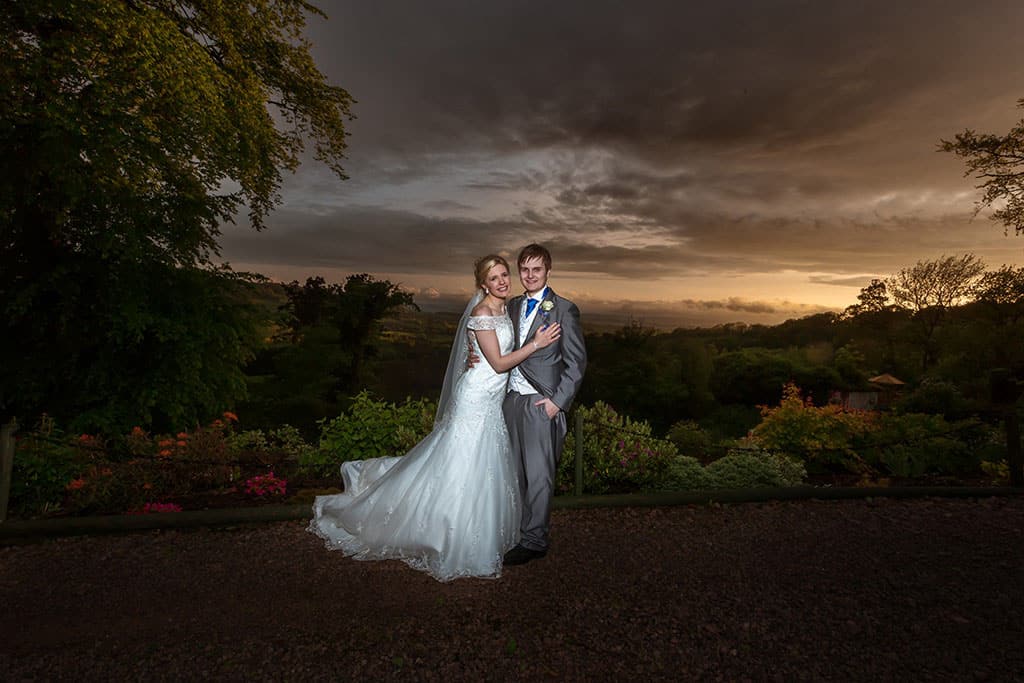
Wedding Art - What is it? To me it's the extra step (sometimes a large step) from what is considered normal wedding photography into a piece of artwork suitable for printing on canvas, or large format print; framing and hanging on your wall in a position where everyone that sees it will go "WOW!"
It's the difference between "Fine Art" and "Photograph". And I say this with a tongue in cheek as many many wedding photographers just add a curves layer onto a wedding photograph and call it 'Fine Art'! In reality, Fine Art is a term that is massively overused in wedding photography; but that's another blog post!
So; how do I create my Wedding Art?
It starts with something dramatic and in my case, it's usually a sunset or a cloudy overcast day. Yes yes I know - every bride wants blue skies and sunshine - and then doesn't get the photographs that do those colours and light justice unless their wedding photographer knows how to manipulate artificial light. (known in the game as Off-Camera Flash). My preferred style is overcast days - I love clouds and dramatic skies and the couples that book me book me for that reason.
So - I've got the clouds, or in the case of this example, a great sunset.
Using some photographer camera magic (shoot on manual mode underexpose the ambient light by 1-2 stops) I can make the scene darker - and thus bring out the sky more. I then add insufficient artificial light to ensure the couple are correctly exposed. The light I add isn't going to be powerful enough to provide enough fill light for the background - but I know that. I take my photographs in a format called RAW. This is an uncompressed format that gives me a lot more detail to play with when I edit the photograph. I know what my camera is capable of capturing and I know what my RAW camera files can do in post-editing.
The before the photograph isn't all that bad really. Pretty good - and something that wedding photographers will be chuffed to have taken. What it isn't is Fine Art or Wedding Art (even if they add a curves layer!)
Editing the Wedding Art Photography
My preferred duo for editing wedding photographs are Adobe Lightroom and Adobe Photoshop. These are the creme de la creme as far as I\'m concerned - other editing suites are available though and some are excellent value - i.e. free! Check out GIMP for a free alternative.
Step 1 - I import the image into Adobe Lightroom. From there I make the basic edits I need to enhance the image, and using Lightroom gets me to a point that is around 80% there.
Step 2 - I export the image from Lightroom and into Photoshop.
Step 3 - In photoshop I fine-tune and adjust. Noise reduction if required, skin smoothing, curves layer on the sky to enhance it that bit more. Final cropping and were done.
The Before & After Shots
Wedding Art

Wedding Art


0 Comments