

Yet another sexy title from me for a blog!! This one though is predominantly aimed at the newer wedding photographers out there. People who are just starting up, getting a hold on their career and wanting to go further. By the way - this is a LONG blog.
The sexy title is an amalgamation of things that many newer photographers don't REALLY thing about and instead rely on super famous rock start photographers, YouTube and Instagram influencers. I'm none of those, but I do run workshops on how to run a successful wedding photography business - and part of running a business is assessing risk, taking measure to reduce risk and contuned assessment of risk.
This blog has been a long time coming, and recently the topic came to the fore when a good friend and wedding photographer told me he uses mirrorless cameras with one SD card slot. I was surprised, and even further surprised when he told me that that the back up he uses was via a BlueTooth link to his mobile phone. And that got me thinking on the probability of card failure, the probability of a BlueTooth link failing, the bandwidth of BlueTooth and it's ability to transfer files etc and the business risk associated with this.
Several top end rock star wedding photographers suggest that the Nikon / Canon mirrorless one card slot cameras are THE BEST for wedding photographers. The image quality may be good but wedding photography is more about running a business than it is about photography. I can't honestly recommend that new / upcoming wedding photographers use any camera with one card slot from a business risk perspective, despite how good the image quality may be. What these people don't explain is the business risk associated with one card slot. More importantly they don't explain what they would do if they lost a series of images due to card failure. That I feel is remiss of them and in my eyes misleading.
Canon & Nikon Mirrorless Cameras - One Card Slot.
So, Canon and Nikon both have mirrorless cameras out there now. All of them have one card slot. A large proportion DSLR's used by professionals have two card slots and have had two card slots for about 7 or 8 years. Many of the professional mirrorless cameras released in the past 5 years also have had 2 card slots, such as those from Sony and Fuji. I use Fuji XT3's which have dual card slots by the way. At the end of this blog, I'll talk you through my assessment of business risk and how I mitigate the loss of wedding photographs.
- Do memory cards (in this case SD type cards) fail? Yes they do. Anything electromechanical will fail at some point.
- Is the risk of card failure increased the more I shoot with the same card? Yes it is. Cards wear out.
- Is the risk of experiencing a card failure increased the more images you take in general? Yes it is.
So. If you are thinking that 2 card slots will have more redundancy that 1 card slot you are correct. That is why camera manufactures introduced dual card slots - as a redundancy / backup. It was something that photographers asked for. It reduces the risk of experiencing image loss due to card failure.
- Did I shoot with one card slot in the early days of my career? Yes, I did. I had no choice.
- Did I mitigate the risk of card failure in my early days? Yes, I did. (See below - I still use the same workflow).
- Does that make me a crap wedding photographer? No. It make me a sensible businessman who realises risk is there, who assess risk, who takes measures to reduce risk and who manages the risk on a daily basis.
So, some technical stuff.
Six Sigma Manufacturing process
Every single branded SD card (I only use SanDisk by the way) will be tested and tested to ensure it meets some damned high specifications. They do not come with a "Guaranteed NOT to fail" sticker though - every thing will fail. What the manufacturing process tries to do is reduce that amount to as little as possible. Probably by using tools like Six Sigma. (Six Sigma is a disciplined, data-driven approach and methodology for eliminating defects (driving toward six standard deviations between the mean and the nearest specification limit) in any process – from manufacturing to transactional and from product to service.)
In other words (and for the real tech heads!) an SD card manufactured to Six Sigma standards must NOT have more than 3.4 defects per 1,000,000. A defect is anything outside of specs, so in the case of an SD card a failure of some kind.
Or to put it another way in 1,000,000 read / write cycles of that SD card it can only have 3.4 errors. Just one of those read/write cycle errors though may render the card corrupted beyond rescue.
A read / write cycle is just that - data being written to or read form the card.
Now I DO NOT know if SanDisk or other SD cards manufactures use Six Sigma standards. I'm making a big assumption there. I also do not know if they actually achieve Six Sigma standards of 3.4 defects per 1,000,0000. They may only be able to achieve lower standards, as I said I have no real idea but would love any information if you can provide it for me to blog accurately? I have asked them for info / comment.
In the 13 years I have been in business I have taken approximately 2,000,000 images. This is based on some rough calculations of the images in my archives. So statistically, based on Six Sigma, I would have had at least 2 card failures. I can tell you know I've had more, around a 5 or 6 in that time. They weren't all SanDisk cards, they were from various brands and were also the older CF types cards. But I've had card failures. I've lost some images. I've paid for those cards to be professionally checked and the data (in most cases) retrieved.
Camera Equipment and Reducing Risk - One Card Slot versus Two Card Slots
So now you are now thinking that if you have one card is 3.4 defects per million and if you have two cards it will be 6.8 defects per million? Nope. The maths doesn't work like that. With two cards it's actually squared.
More maths for the tech-heads.
You may (or not?!) be surprised that even some of the worlds top wedding photographers have no idea about this yet still push a camera brand (possible because they are ambassadors?) and come out with totally incorrect and factually wrong information. I've removed the names etc, and the OP has also deleted the comments after some uncalled for insults to me on their part. This isn't about trolling someone. It's about getting the facts correct and making sure people understand the business risk associated with choosing a camera.
The phrase I took issue with is "Do you know 2 card slots have more chance of being corrupted and there could be more chance of both cards being corrupted". That is total and utter BS. The comment about cameras not using cards...well watch the video below. Tony Northrop mentions the same thing in September 2018 so it's not really a prediction from that wedding photographer.
If a card failure is called 'n' then the probability of two cards failing is 2n. The probability of BOTH cards failing at the same time is actually n2 - n squared.
So let's say you get some really unreliable cards that have a defect rate of 0.01 per 1,000,000. These cards are manufactured to 99.99% tolerances. (Which isn't as good as true Six Sigma by the way, that's 99.999% tolerance).
One card - n = 0.01 failure rate
Two cards = 2n = 0.01 + 0.01 = 0.02 failure rate
But hold on. The probability of BOTH cards having defects AT THE SAME TIME is actually n2 or n squared
n2 = 0.02 * 0.02 = 0.0004
Or in other words a really really low chance of BOTH cards being corrupted and losing ALL the images on BOTH cards. You have a greater chance of losing images on cameras with one card slot than with two card slots. Especially so if the cameras write to the dual cards sequentially and not interleave the writing process. (I've asked Fuji for info on this - still waiting.)
Yea sure, the chances of a brand spanking new card failing is low. But they will fail. If you, as a wedding photographer, have never experienced a card being corrupted you are lucky. That doesn't mean it won't happen. To quote from a Facebook group...
"It's like a child playing with matches. They may get lucky and not hurt themselves right away, but eventually they'll get burned." The more matches the child plays with the greater the chances of them being burned.
Or to put it another way. When was the last time you had ALL four tyres of your car blow out at the same time.
Do you want to take the risk - Reducing risk with camera equipment
That's the $6 million dollar question isn't it.
Personally I wouldn't go back to a camera with one card slot for professional use. I'm sure that Robert Cappa on the Normandy beaches in June 1944 would have preferred to have a film camera that shot dual rolls. Did I lose rolls of film due to poor darkroom techniques or bad film? Yes - it happens. Back then it was accepted because there was no real redundancy except to use two cameras each with a roll of film and take the same photograph with each camera. But we are in the 21st Century. It is accepted that we live in a digital world and that digital needs to be backed up. What's more it's accepted by wedding couples that digital needs to be backed up!
And here is the real risk. You shoot on a camera with one card slot. You stand a greater chance of losing images than I do. Period. I'm mitigating the risk of losing images more than you are. I have assessed the business risk and took actions and steps to reduce that risk. If you use one card slot you haven't. You have accepted the risk that your cards may fail and you may lose images. You are accepting the risk that the card you have in your camera may have been subject to the Friday Afternoon process. It may even be a cheaper card with worse tolerances.
What about if I use smaller capacity cards?
Sure, go ahead. You only lose one section of a wedding that way. To quote a guy in a Facebook group "The fallout from the loss of a key moment of the ceremony (vows, rings, bride down the aisle, wine/sand ceremony, etc) will easily make the difference between a happy repeat customer to that of one hell-bent on making sure everybody in town knows of the buffoon that lost the photos of their wedding"
What about if I use two cameras?
Crack on. Unless you shoot the same image with each camera (like Robert Cappa probably wished he could do) you will still lose stuff. You won't be aware of corrupted cards until you chimp on the back of the camera or go to back-up the card.
And I was more than a little shocked by the comment from the wedding photographer in the quote. Only uses one camera. The others are backup. So they realise things may fail and bring backups...but continue to use (and advocate) cameras with one card slot, even though cards will get corrupted?! Nothing like a contradiction there.
My camera backs up to my mobile phone (Canon EOS R)
Whoo Hoo. That means...
- Your camera HAS to be close to your phone at all times.
- Your camera HAS to be switched on at all times.
- Your camera HAS to have Bluetooth on at all times.
- Your phone HAS to be ON at all times (not standby).
- You phone NEEDS to be a modern updated phone to give it high enough Bluetooth transfer speed specs
- Your phone HAS to be close to your camera at all times.
- Your phone HAS to have enough storage capacity for the files.
- Canon EOS R app only stores jpgs files on the phone, not RAW files. So your exposure HAS to be pretty much perfect.
- You WILL need spare batteries on hand all the time because leaving Bluetooth on on the phone and camera will reduce battery life / shot life.
- You will NEED one phone (or mobile device with Bluetooth and an IOS or Android OS) per camera.
- You will need to spend maybe 5 minutes every time you turn the camera off to change lenses to sync the phone and camera again.
That isn't a risk management strategy. That's a wing and a prayer your card doesn't get corrupted!
The video is a year old, but I can't find anything updated with a real world test or even if Canon have updated the camera / app so it works better. The comments are where the real information is.
Worst Case Scenario
You lose images. You get taken to court.
I can guarantee that the wedding couple WILL take professional legal advice. They WILL do a search on Google about cameras, about card slots, about risk etc (see the video above). They will trot out every YouTube video that suggest that those Canon and Nikon mirrorless cameras were hammered because they had one card slot. They will show that those same YouTubers suggested NOT to use them for professional use etc etc.
Judge - “Are cameras available with two or more card slots?”
You - “Yes”
Judge - “Why didn’t you use this brand cameras”
You - “I was told by a respected global wedding photographer I didn’t have to bother with cameras with two card slots and I wanted to save money by using the same lenses I already had”
Judge -“So you didn’t take adequate precautions to ensure you had multiple copies / backups by utilising two card slots despite the technology being freely available at a price and performance point at the same level as the camera you are now using, and that you did this in an attempt to save money?”
You - “Yes, but my contract says I can’t be held responsible for failures like that”
Judge - “The contract clause is [my words - probably] invalid as you failed to take adequate and sensible precautions that you could have easily taken. Those precautions wouldn’t in reality have cost you much more money and in practise you put profits before results.”
You want to go there? I'm sure the insurance company you use will want to see your business risk assessments on using cameras with one card slot as opposed to two cards slots before the represent you. Remember they expect you to take all reasonable precautions. Even if you win you have a very very emotional couple on your hands so it's either pay them off with an NDA or the very real risk of being touted on social media.
How you run your business is totally up to you. And I'm not saying that for professional use you NEED two cards slots. I'm saying that as a business you should look at the risk associated with running that business and reduce the risk of losing images by using cameras with dual slots. Both the Canon & Nikon mirrorless offerings are by all accounts excellent in terms of image quality, lens quality etc. Wedding Photography, Camera Equipment and Reducing Risk
My Wedding Workflow - How I Backup
MY WEDDING WORKFLOW - THE KIT
I use Fuji XT3's for my wedding photography. I have four of them and I bring three to a wedding at any one time. I try to avoid changing lenses during the day but sometimes you need to.
Each Fuji XT3 has two SD card slots. I use Sandisk SD cards, 64Gb in size and have two of these cards in each camera. One card is RAW files and one card is the same file but in JPG version.
I buy 6 new SD card every 6 months and put the older ones in a bag in the office. I've got loads of them and NO I won't sell them or give them out to other photographers; I don't want you to blame me if the card goes wrong!
At each wedding I therefore have x6 SD cards in the cameras plus another x6 in a hard storage case in my camera bag.
I take my MacBookPro to my weddings because I like to do a same day slideshow at the wedding. I also take x2 external SSD's.
My Wedding Workflow - The Cameras
I use multiple cameras with different lenses throughout each section of the day. So if a camera does fail in someway that means the cards are corrupted, I have multiple shots on the other two cameras to fall back on.
Why multiple cameras? Because the chances of three cameras failing at the same time are waaaaay less than two failing and waaaaaaaaaaaaaay less than one failing. Same numbers as above!
My Wedding Workflow - The Wedding Flow
As I mentioned I like to do a same day slideshow and for me this starts during the prep stage of the morning. I'm not shooting constantly so at an appropriate interval I'll sit down, get the MacBookPro out and back the images from BOTH card slots on each camera to the SSD on the MacBookPro. I then back those up to the x2 SSD's. SO I now have x3 backups, with x2 of those backups on separate external drives. Yeah - I'm paranoid about losing images.
I import the jpgs into Adobe Lightroom and start the quick culling process, apply my set preset and that is the start of my slideshow. I LOVE the Fuji JPG files because I can fine tune them to give me the same look straight of out camera (SOOC) as the RAW file would look if I process them in Adobe Lightroom.
I run this part of the process (import, cull, edit) several times a day. By the time of the wedding breakfast I'm pretty much backed up with everything on x3 hard drives and x6 SD cards and I have a good start to my final editing and a same day slideshow to boot.
My Wedding Workflow - The Office Flow
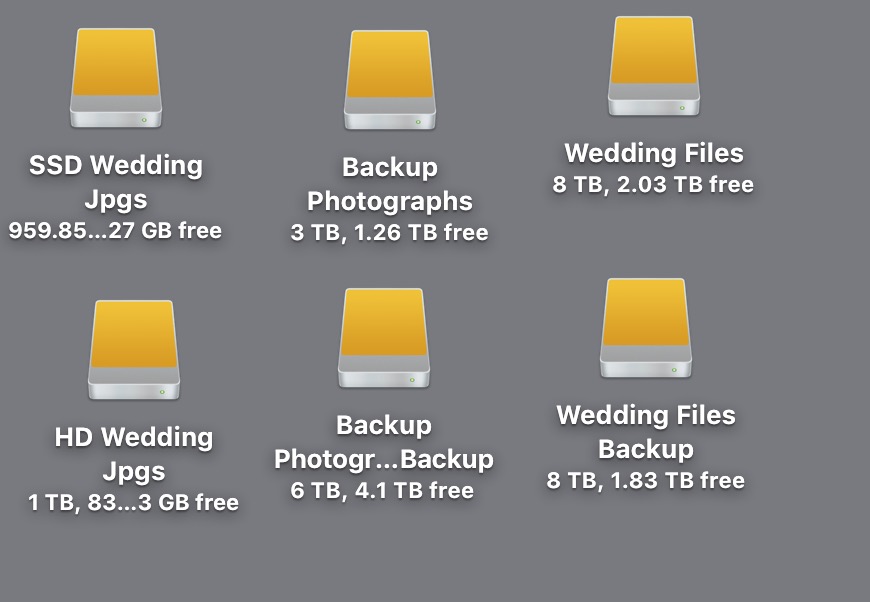
I get back after a wedding and the first thing I do is connect one of the SSD's to ny iMac and start to transfer both RAW folder and JPG folder to the appropriate hard drive that is connected to my iMac. I have a 8Tb HD that is also copied to another 8Tb HD for my immediate weddings. I also copy the current wedding files to a Networked Attached Storage (NAS) solution that has 8Tb capacity that runs RAID. I use Carbon Copy by Bombich for my hard drive cloning.
Why multiple hard drives? Because the chances of two hard drives failing at the same time are waaaaay less than one hard drive failing. Same numbers as above!
The SSD Wedding JPGs contain the latest finished wedding JPGs and the HD Wedding JPGs is a clone of that. I use the SSD drive to quickly access finished images.
The Backups are for my own personal stuff.
So I edit the weddings, export the finished JPGs and copy those to the SSD mentioned above. I then use that SSD as the drive from which I finish the hand editing from.
Once that is done I upload the finished JPGs to my gallery service. I use Zenfolio and have just started using Pic-Time for this. I upload as soon as I have finished the final edits. The quicker I can finish and upload the less risk there is in either the SSDs or HDs failing. I've had HDs fail and I've had one of the x4 HDs in the NAS fail. Due to he copies I have I haven't lost anything of importance to a client.
Meanwhile the RAW files and JPG files are STILL on my x2 external SSDs and will only be deleted when space runs out in date order.
Risk
Risk is something that MAY happen. And "Sod's Law" says that if it CAN happen it WILL happen. So I always look to mitigate the risk of running my business as much as possible. The 21st C is a digital age. Digital needs backups. It needs redundancy.
I assess risk using the standard project management (I'm qualified in several project management methodologies by the way) chart of Probability vs Impact:
The probability of a an SD card failing is rare - unlikely. The imapct therefore is medium. However, when working within an emotional charged business such as weddings that "medium" impact to me is actually high. That's why I use two cards slots, multiple cameras, multiple lenses, multiple hard drives.
For any professional photographer to say otherwise they are talking out their backside. Just ask them how many hard drives they use to backup images. I bet they will ALL say at least two. One for the main and one for the backup. Hard drives fail. It's well known. Have a read of this from the online backup solution BackBlaze. An average failure rate of 1.68% for hard drives.
SO WHY THE HECK DO THEY ADVOCATE USING CAMERAS WITH ONE CARD SLOT??!!!!!!!!
Wedding Couples!
By the way, if you are a wedding couple who have taken the time to read this (thank you!) make sure you ask your wedding photographer what cameras they use, how many card slots they have and how they assess and mitigate the risk of losing your wedding photographs. You can then make an informed decision on whether to book them if they use cameras with one card slot...but if you ask the question you are also accepting part of that risk yourself.


0 Comments