

Luminar 2018 Real Word Review
So I downloaded Luminar 20128 yesterday and only had a short while to test, and today I'm photographing a wedding (Celtic Manor Resort, Vickie & Paul) so have a little bit of time to play around. First impressions - It's slower than Lightroom to import and render a Fuji XT2 .raf file by around 3 seconds. Not a huge difference if you are an amateur but if you are a wedding/portrait/fashion/landscape or in fact being paid and your time is important those 3 seconds are a long time. I shoot maybe 1000 in a 10 hour day at a wedding. Those 3 seconds on import is 50 minutes extra of my time... if I could import all at once which I can't I have to do it one at a time at the moment. EDIT - I just reopened the same image in Luminar 2018 and it took 18 seconds to render the very same image, compared to 15 or so on the first run through.Render Quality
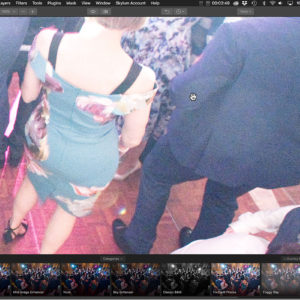
Next up is the render quality. Many people moan that Adobe Lightroom isn't the best for Fuji, personally, I've not had issues. However looking at a 100% crop of an image in Lightroom and then in Luminar with both images pushed to +5 exposure Lightroom. The skin tones look amazingly better in Lightroom. To render the same image with roughly the same edits - Lightroom - A shade over 10 seconds. Luminar - just under 20 seconds.
100% - Luminar 2018

100% - Adobe Lightroom Classic
Batch Processing.
I know Lightroom is slow, but compared to Luminar doing roughly the same thing Lightroom is a speed freak! Lightroom also happens to compress the images rendered at full-size jpg's at a lower size, despite using what looks like the exact same settings! 26Mb in Luminar 2018 versus 16Mb in Lightroom. Yes, hard drive space is cheap - but again, come on. 500 images exported will add up to an extra 4Gb. (Geeks please check those numbers!) I don't know whether it's because I tweaked the presets in Lightroom for my style, but the images look a lot better as well. More testing is needed for this.
Luminar 2018 Batch test Luminar 2018 Real Word Review

Lightroom Classic Batch Test
Batch Processing using User Preset - Luminar 2018 Real Word Review
What a nightmare this is. I took a basic preset, tweaked it a touch then saved it. I then ran (several) batch test from RAW to JPG. EVERY SINGLE IMAGE came back green / night vision type camera. EVERY ONE. No exception. The same images ran through Luminar 2018's in-built presets were fine.


0 Comments